- July 1 2026
-
 Akshay Joshi
Digital Classroom: Lessons Learned from the Field
Education is changing fast. Schools, colleges, universities, coaching centers, and corporate learning teams now need classrooms that support interactive teaching, online learning, secure collaboration, and easy content sharing.
But many institutions make one common mistake: they buy a smart board, camera, or video meeting tool without checking the full classroom environment. They may miss important needs such as Wi-Fi strength, room audio, cybersecurity, faculty training, content storage, and long-term support.
When this happens, the technology is not used well. The institution spends money, but teachers and students do not get the full benefit.
This blog explains what a digital classroom includes, what mistakes to avoid, and how to choose the right solution for your institution.
What Is a Digital Classroom?
A digital classroom is not just a smart board. It is a complete learning ecosystem where hardware, software, network, security, and training work together.
A good digital classroom may include:
Interactive flat panel displays
AI-powered cameras
Professional microphones and speakers
Wireless presentation tools
Learning Management System (LMS)
Video conferencing platforms such as Zoom or Microsoft Teams
Cloud storage for recorded lectures and learning material
Digital whiteboarding
Classroom management software
Student devices
Secure Wi-Fi and network infrastructure
Cybersecurity and identity management
Hexatic helps educational institutions plan, deploy, and manage smart learning solutions that are engaging, secure, and scalable.
Why Institutions Choose Digital Classrooms
Institutions are moving toward digital classrooms because they want better learning outcomes and a more flexible teaching experience.
Students can learn through videos, live examples, quizzes, and digital notes.
Teachers can explain topics more clearly with interactive tools.
Remote students can join live classes when hybrid learning is needed.
Recorded lectures can be reused for revision and missed classes.
IT teams can manage classrooms, devices, users, and security from one place.
The institution becomes more future-ready and improves its reputation.
Common Mistakes to Avoid
Mistake | Why It Creates a Problem |
Buying hardware without planning | The classroom may not support the selected device or platform. |
Ignoring network capacity | Live classes, recordings, and screen sharing may lag or fail. |
Poor classroom acoustics | Students may not hear the teacher clearly, especially online learners. |
No faculty training | Teachers may avoid using the tools or use only basic features. |
Weak cybersecurity | Student data, institutional systems, and online classes become risky. |
Incompatible platforms | Tools may not work smoothly together. |
No maintenance strategy | Classrooms may stop working well after the first few months. |
No integration plan | The institution may end up with many disconnected applications. |
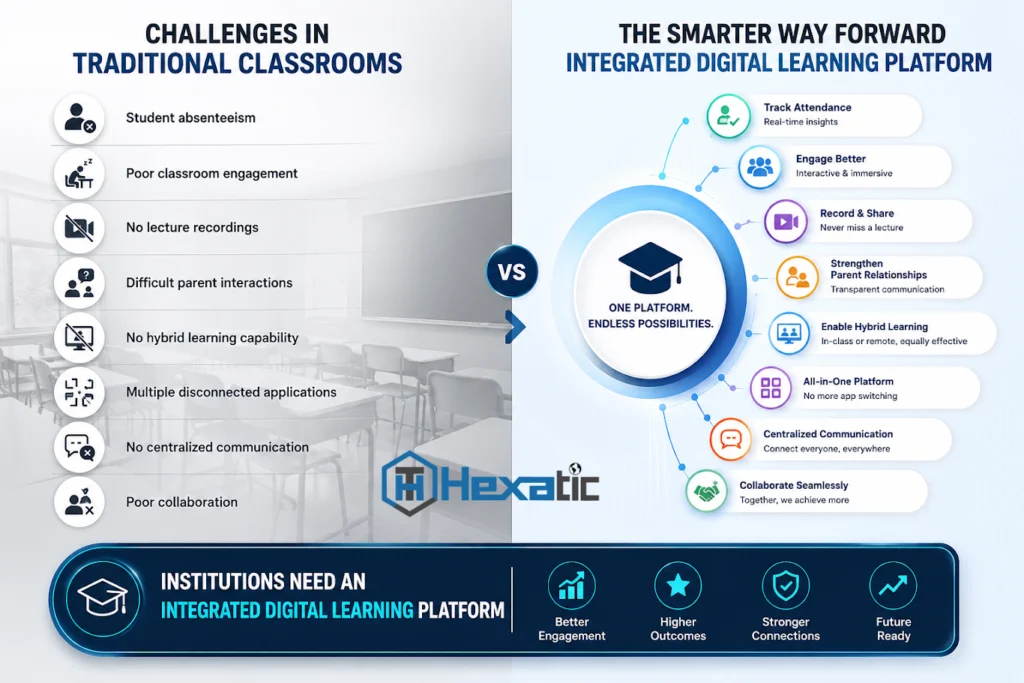
Challenges in Traditional Classrooms
Traditional classrooms often struggle with:
Low student engagement
Student absenteeism
No lecture recordings
Limited parent and student interaction
No support for hybrid learning
Multiple disconnected applications
No centralized communication
Poor collaboration between teachers and students
This is why institutions need an integrated digital learning platform instead of many standalone tools.
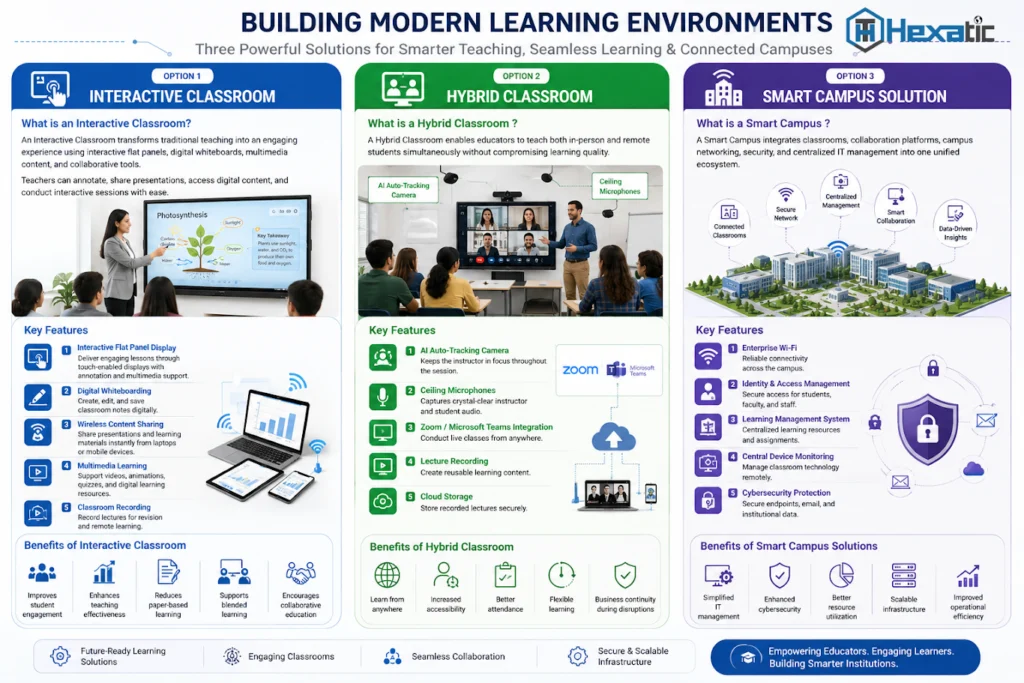
Option 1: Interactive Classroom
An interactive classroom uses interactive flat panels, digital whiteboards, multimedia content, and collaboration tools to make teaching more engaging.
Key features include:
Interactive flat panel display for touch-based teaching and annotation
Digital whiteboarding to create, edit, save, and share notes
Wireless content sharing from laptops, tablets, and mobile devices
Multimedia learning with videos, animations, quizzes, and digital resources
Classroom recording for revision and remote learning
Best for: schools and colleges that want smart teaching inside the classroom.
Option 2: Hybrid Classroom
A hybrid classroom allows teachers to teach in-person and remote students at the same time. The goal is to give both groups a clear and engaging learning experience.
Key features include:
AI auto-tracking camera to keep the teacher in focus
Ceiling or boundary microphones for clear teacher and student audio
Zoom or Microsoft Teams integration for live online classes
Lecture recording to create reusable learning content
Cloud storage to keep recordings and materials secure
Best for: institutions that need online classes, remote learning, flexible attendance, and continuity during disruptions.
Option 3: Smart Campus Solution
A smart campus connects classrooms, collaboration platforms, networking, cybersecurity, identity management, and centralized IT operations into one ecosystem.
Key features include:
Enterprise Wi-Fi for reliable connectivity across the campus
Identity and access management for students, faculty, and staff
LMS integration for assignments, learning resources, and progress tracking
Central device monitoring to manage classroom technology remotely
Cybersecurity protection for endpoints, email, users, and institutional data
Best for: universities, multi-campus institutions, and organizations planning complete digital transformation.
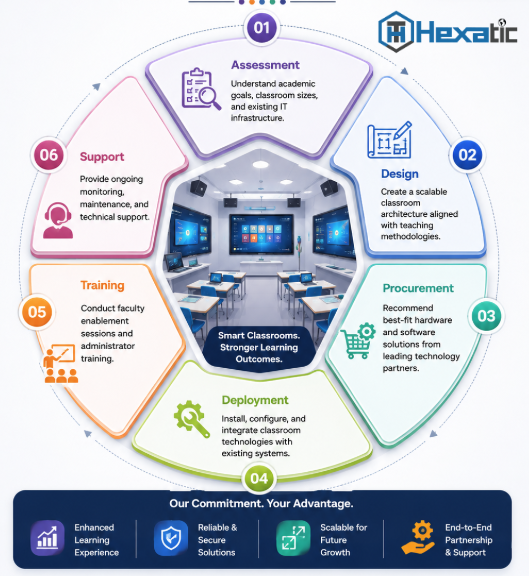
Hexatic’s Digital Classroom Implementation Framework
Assessment: Understand academic goals, classroom size, existing IT infrastructure, faculty needs, and student expectations.
Design: Create a scalable classroom architecture that matches teaching methods and future growth.
Procurement: Recommend the right hardware and software from reliable technology partners.
Deployment: Install, configure, test, and integrate classroom technologies with existing systems.
Training: Train teachers, administrators, and IT teams so the solution is used with confidence.
Support: Provide monitoring, maintenance, upgrades, and technical support after deployment.
Best Use Cases
Schools, colleges, and universities
Medical, engineering, pharmacy, and law colleges
Corporate learning centers and enterprise campuses
Multi-campus institutions
Coaching centers and skill development institutes
Complete Digital Classroom Solution Stack
Layer | Example Solution |
Collaboration | Digital workspace |
Smart classroom | Smart boards |
Online classes | Online meeting tools |