- June 27 2026
-
 Nikhil Patil

Zoom Meetings vs Zoom Webinar vs Zoom Webinar Plus: A Simple Buying Guide for Businesses
TL;DR: Choose Zoom Meetings when everyone needs to talk and collaborate. Choose Zoom Webinar when a few presenters broadcast to a larger audience that mainly watches and uses Q&A and polls. Choose Zoom Webinar Plus when you also want ticketing and registration features, Production Studio and backstage controls, deeper analytics and enhanced branding. Zoom Events is a separate product for multi-session conferences.
Virtual communication is now a business need, not just a convenience. Whether your team wants to run daily standups, deliver customer training, host a product launch or run a large virtual event, the right Zoom solution directly affects engagement, productivity and business outcomes. But Zoom offers more than one product.
Should we choose Zoom Meeting, Zoom Webinar, or Zoom Webinar Plus?
This buying guide explains the differences, key features, benefits and real business use cases in simple language, so you can take an informed decision for your organisation.
Understanding the Zoom Portfolio
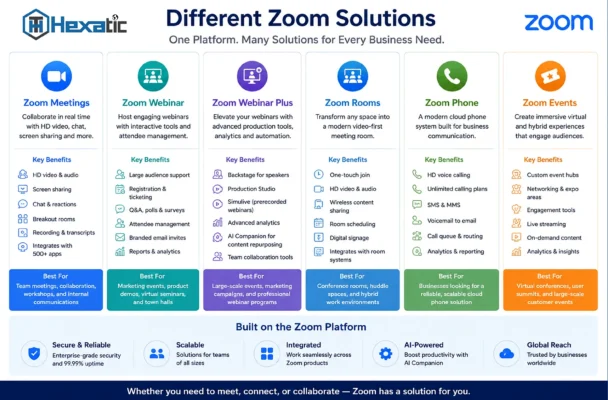
Zoom gives you different communication experiences based on audience size, level of interaction and the goal of your event.
Zoom Meeting → Interactive collaboration for teams and everyday communication.
Zoom Webinar → Structured broadcasting for customer-facing and large-scale events.
Zoom Webinar Plus → Advanced webinar experiences with extended event and engagement features.
Note for businesses Many IT, education, healthcare and manufacturing companies already use a mix of these products – for example Zoom Meetings for internal teams and Zoom Webinar for customer events. Hexatic helps businesses identify, implement and optimise the right mix as per their growth and customer engagement goals. |
Option 1: Zoom Meeting
What is a Zoom Meeting?
Zoom Meeting is built for collaborative communication, where everyone can take part using video, audio, chat and screen sharing. Unlike a webinar, a meeting gives equal participation to all attendees.
Key Features of Zoom Meeting
Interactive video collaboration – face-to-face communication with multiple participants.
Screen sharing and co-annotation – share presentations and documents and work together in real time.
Team communication tools – chat, reactions, breakout rooms and collaboration controls.
Recording and meeting summaries – record sessions for future reference and internal knowledge sharing.
Flexible scheduling – create recurring meetings with calendar integration.
Business Benefits of Zoom Meeting
Improves team collaboration.
Speeds up decision-making.
Supports hybrid and remote work – useful for distributed teams across geographies.
Reduces travel dependency and saves cost.
Increases meeting productivity.
Best Business Use Cases
Internal team meetings and daily standups.
Project collaboration and client discussions.
Employee onboarding and weekly leadership updates.
Customer support conversations.
Option 2: Zoom Webinar
What is a Zoom Webinar?
Zoom Webinar is built for organisations that need to communicate with larger audiences while keeping structured presenter controls. Hosts and panelists manage the experience, while attendees take part through moderated interaction tools.
Key Features of Zoom Webinar
Large audience broadcasting – Deliver presentations to large audiences with controlled attendee participation.
Audience engagement tools – Support interaction through live chat, Q&A, polls, reactions and feedback tools.
Registration and lead capture – Generate registrations using custom forms, email confirmations, attendance tracking and marketing workflows.
Branding and customisation – Deliver polished virtual experiences through event personalisation.
Recording and content repurposing – Turn webinars into reusable assets through recordings and on-demand sessions.
Reporting and analytics – Measure attendance, registration performance, engagement and overall event outcomes.
Business Benefits of Zoom Webinar
Scales customer communication.
Supports lead generation – useful for B2B companies and education institutes in Pune.
Improves event professionalism.
Creates measurable engagement.
Enables better audience management.
Best Business Use Cases
Product launches and marketing campaigns.
Educational webinars and customer training.
Executive communication.
Demand generation events.
Option 3: Zoom Webinar Plus
What is Zoom Webinar Plus?
Zoom Webinar Plus extends webinar capabilities for organisations running more sophisticated digital events that need higher engagement, scalability and a premium audience experience. It is designed for businesses that want to maximise event impact and business outcomes.
Key Features of Zoom Webinar Plus
Enhanced event experiences – create highly polished virtual engagement journeys.
Expanded audience management – support larger audiences and advanced event execution.
Simulive capability – schedule a pre-recorded Zoom cloud recording as the main video for a scheduled webinar.
Production tools – Backstage and Production Studio for a studio-style, broadcast-quality experience.
Advanced registration experiences – improve attendee acquisition and qualification.
Deeper analytics and performance insights – clear visibility into engagement and business impact.
Extended content lifecycle – convert event content into ongoing engagement, including AI-generated clips.
Business Benefits of Zoom Webinar Plus
Creates premium virtual experiences.
Strengthens marketing performance.
Improves conversion opportunities.
Enhances attendee engagement.
Supports enterprise-scale communication.
Best Business Use Cases
Enterprise virtual events and large-scale product launches.
Multi-session customer programs.
Executive town halls and thought leadership campaigns.
Strategic partner events.
Comparison Snapshot
Here is a quick side-by-side comparison to help you decide faster:
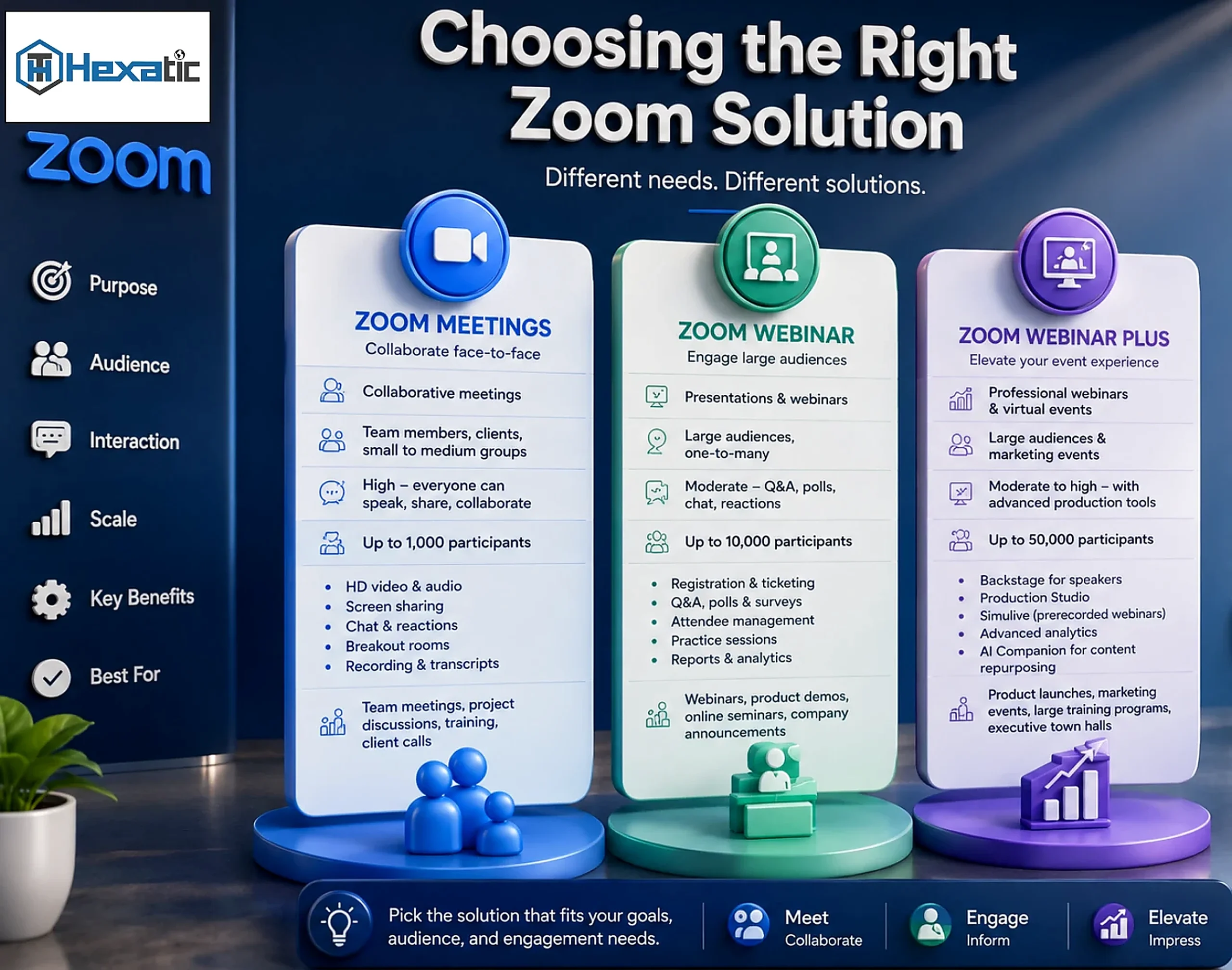
Feature | Zoom Meeting | Zoom Webinar | Zoom Webinar Plus |
Best for | Collaboration | Presenting to large audiences | Professional webinar programs |
Audience participation | Everyone can talk, video and share | Attendees mostly watch | Attendees watch; hosts run broadcast-style events |
Interaction | High | Moderate (Q&A, polls) | Moderate to high with production tools |
Registration | Optional | Built-in | Advanced branded registration |
Presenter controls | Basic | Host/panelist controls | Backstage + production controls |
Video production | Standard meeting | Standard webinar | Studio-style layouts + 1080p |
Analytics | Meeting reports | Webinar reports | Advanced engagement analytics |
Content reuse | Recording | Recording | AI-generated clips / content |
Scale | Team collaboration | Large audience presentations | Large recurring event programs |
How to Choose the Right Zoom Solution
Choose Zoom Meeting – if your priority is collaboration and two-way communication.
Choose Zoom Webinar – if your priority is customer engagement and structured virtual events.
Choose Zoom Webinar Plus – if your priority is premium, scalable and business-driven event experiences.
A simple way to decide is to ask three questions: How big is my audience? How much interaction do I need? What is the goal of my event – collaboration, engagement or impact?
Frequently asked questions
What is the main difference between Zoom Meeting and Zoom Webinar?
In a Zoom Meeting, everyone can speak, share video and collaborate equally. In a Zoom Webinar, hosts and panelists present while attendees mostly watch and interact through Q&A, polls and chat. Use Meetings for collaboration and Webinars for broadcasting to a larger audience.
What is the difference between Zoom Webinar and Zoom Webinar Plus?
Both are built for presenters broadcasting to an audience, and Zoom says they support the same audience capacity tiers. Webinar Plus adds ticketing and registration features, speaker bios, engagement analytics, Production Studio, 1080p streaming, backstage coordination and enhanced branding. Choose Plus when event polish and measurement matter; the standard Webinar is enough for occasional sessions.
How is Zoom Events different from Zoom Webinar?
Zoom Webinar runs a single large online event with presenters and a mostly watching audience. Zoom Events is a separate platform for multi-track, multi-day programmes such as hybrid conferences, with features like a virtual expo hall for sponsors. For one-off webinars, Webinar or Webinar Plus is usually enough; choose Events for conference-style programmes.
Which Zoom product is best for product launches and marketing events?
Zoom Webinar is ideal for most product launches and marketing campaigns because of registration, lead capture and analytics. If you want a premium, studio-style experience with Backstage, Simulive and AI-generated content, Zoom Webinar Plus is the better fit.
Is Zoom Webinar Plus worth it for a growing business?
Yes, if you run frequent or large-scale events and want higher production quality, deeper analytics and better content reuse. For occasional webinars, the standard Zoom Webinar is usually enough. A quick consultation can help you avoid paying for features you do not need.
Can businesses in Pune get local support for Zoom licensing and setup?
Yes. Hexatic Tech Pvt. Ltd. provides Zoom licensing, setup, onboarding and optimisation support for businesses in Pune, Pimpri-Chinchwad (PCMC), Hinjewadi, Baner, Kharadi, Viman Nagar, Hadapsar and surrounding areas.
How many attendees can a Zoom Webinar support?
According to Zoom, standard Webinar subscriptions support 500 to 10,000 attendees, and with Zoom support approval can scale to 100,000. Zoom also offers larger single-use licences for very large events in some markets. Capacity depends on your plan and add-ons, so confirm the right tier with Hexatic before you buy.
Final Thoughts
The right Zoom solution depends on your business goals, audience size and engagement expectations. For organisations evaluating digital communication platforms, choosing the correct experience can improve customer interactions, increase operational efficiency and unlock stronger business outcomes.
Talk to a Zoom Expert in Pune Not sure which Zoom product fits your business? Hexatic helps companies choose, set up and get the most out of Zoom Meetings, Zoom Webinar and Zoom Webinar Plus. Get a free consultation → Write to us and our team will help you pick the right plan. |