

AI Agent Harness: The Architecture Behind Reliable AI Agents
AI agents are moving from impressive demos into real business workflows. They can search knowledge bases, call APIs, analyze files, update systems, write code, route tickets, and coordinate with other agents. But the more responsibility an agent has, the more important its surrounding architecture becomes.
That architecture is often called an AI agent harness.
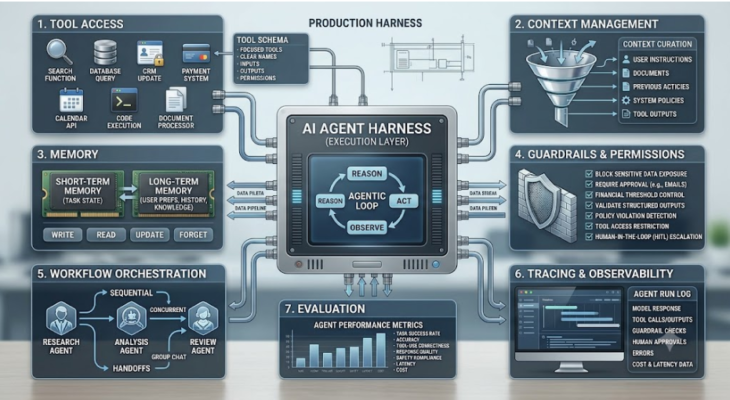
An AI agent harness is the software layer that turns a language model into a controlled, tool-using system. It gives the agent access to context, tools, memory, permissions, monitoring, and workflow logic. Without it, an AI model can generate useful text. With it, the model can participate in a real process.
The important point is simple: the model is only one part of the agent. The harness is what makes the model useful, observable, and safe enough for production work.
What Is an AI Agent Harness?
An AI agent harness is the infrastructure wrapped around a large language model that allows it to act on tasks rather than only respond to prompts.
It usually includes:
Tool access
Context management
Memory
Guardrails
Workflow orchestration
Logging and tracing
Evaluation
Human approval flows
Error handling
Permissions and policy controls
A helpful shorthand is:
AI agent = model + harness
The model provides reasoning and language ability. The harness provides the working environment.
LangChain describes the harness as the system around the model that turns intelligence into useful work. Databricks makes a similar point, explaining that the harness connects the model to tools, systems, memory, execution environments, and feedback loops.
That distinction matters because many AI projects fail when teams focus only on model quality. A powerful model connected to weak context, unclear tools, and poor monitoring can still produce unreliable results. A strong harness can make even a less expensive or smaller model more useful by giving it the right structure.
Why AI Agents Need a Harness
A chatbot can answer a question. An agent needs to complete a task.
That difference changes the engineering problem.
Imagine a support agent asked to process a refund request. It may need to:
Read the customer’s message
Check the order history
Review the refund policy
Identify whether the case is eligible
Ask for human approval if the amount is high
Update the customer record
Send a response
Log the decision
A model alone cannot safely manage that workflow. It needs clear access rules, tool definitions, approval checkpoints, error handling, and audit trails. The harness provides those controls.
This is especially important because agent behavior can be nondeterministic. The same agent may not take the exact same path every time. That does not make agents useless, but it does mean teams need observability, tests, and constraints.
OpenAI’s Agents SDK, for example, includes tracing for model calls, tool calls, handoffs, guardrails, and custom events. That kind of visibility is not a luxury in production systems. It is how teams debug, evaluate, and improve agent behavior over time.
The Harness Is Where Production Value Lives
The strongest expert opinion emerging in the AI engineering space is that the future of agents will not be won by prompts alone.
Models matter, but production agents depend on everything around the model.
LangChain’s view is direct: an agent is a model plus a harness, and harness engineering is how teams turn models into work engines. Databricks argues that strong harnesses can make average models useful, while weak harnesses can waste even the best models. Microsoft’s Azure Architecture Center also emphasizes orchestration patterns because enterprise agents often need to coordinate reasoning components, workflows, tools, and handoffs.
The expert takeaway is this:
The model is the reasoning engine. The harness is the operating system for work.
That means teams should not treat the harness as a thin wrapper or afterthought. It should be designed with the same seriousness as any production software system. A good harness controls data flow, tracks decisions, limits risk, and gives teams enough visibility to improve performance.
For business leaders, this also changes how AI investments should be evaluated. Choosing a model is only one decision. The bigger question is whether the organization has the architecture to make that model dependable.
Core Components of an AI Agent Harness
1. Tool Access
Tools allow an agent to act.
A tool might be a search function, database query, CRM update, payment system, calendar API, code execution environment, or document processor. The harness defines what tools the agent can use, what inputs are allowed, and what happens after the tool returns a result.
Poor tool design is one of the fastest ways to create unreliable agents. If tools are vague, overlapping, or unsafe, the agent may choose the wrong action. Strong harnesses give agents focused tools with clear names, descriptions, input schemas, and permission rules.
2. Context Management
Agents need the right context at the right time. Too little context leads to bad decisions. Too much context creates noise, cost, latency, and privacy risk.
Context management decides what information is passed into the model for each step. This may include user instructions, documents, previous actions, database results, system policies, and tool outputs.
A mature harness does not simply dump everything into the prompt. It curates context based on the task.
3. Memory
Memory helps agents work across multiple steps or sessions.
Short-term memory may track what happened during the current task. Long-term memory may store user preferences, project history, recurring decisions, or organizational knowledge.
Memory is powerful, but it is also risky. Teams need to decide what should be remembered, how long it should be stored, who can access it, and how incorrect memory can be corrected.
4. Guardrails and Permissions
Guardrails help prevent the agent from doing something unsafe, unauthorized, or low quality.
Examples include:
Blocking sensitive data exposure
Requiring approval before sending emails
Preventing financial actions above a threshold
Validating structured outputs
Detecting policy violations
Restricting access to certain tools
Escalating uncertain cases to humans
Guardrails should not rely only on prompt instructions. Prompts are useful, but production systems need enforceable controls outside the model as well.
5. Workflow Orchestration
Orchestration controls how work moves through the agent system.
Microsoft’s Azure guidance describes patterns such as sequential workflows, concurrent execution, group chat, and handoff patterns for multi-agent systems. These patterns matter when one agent cannot or should not do everything.
For example, a research agent may gather sources, an analysis agent may summarize findings, and a review agent may check accuracy before the final output is delivered.
The harness decides how these parts coordinate.
6. Tracing and Observability
Tracing records what the agent did during a run.
This may include:
Model responses
Tool calls
Tool outputs
Guardrail checks
Human approvals
Errors
Handoffs
Timing and cost data
Without tracing, teams are left guessing why an agent behaved a certain way. With tracing, they can debug failures, detect patterns, improve prompts, adjust tools, and evaluate performance.
7. Evaluation
Evaluation tests whether the agent performs well enough for real use.
This can include task success rates, accuracy checks, tool-use correctness, response quality, safety compliance, latency, and cost. The best agent teams build evaluation into the harness rather than treating it as a one-time review.
AI Agent Harness vs. AI Agent Framework
An AI agent harness is the architecture around the model. An AI agent framework is a tool that may help build that architecture.
Frameworks and SDKs such as OpenAI Agents SDK, LangChain, LangGraph, Microsoft Agent Framework, and similar tools can simplify parts of the process. They may provide tool calling, orchestration, tracing, memory patterns, handoffs, and guardrail support.
But a framework does not automatically give you a good harness.
Teams still need to define the workflow, permissions, context strategy, data boundaries, evaluation process, and failure handling. The framework can accelerate development, but the design responsibility remains with the team.
Challenges of Building an AI Agent Harness
Building an AI agent harness is not just a coding task. It is a system design challenge that touches product, security, engineering, data governance, and operations.
1. Defining the Agent’s Scope
Many teams start too broadly. They ask the agent to “handle customer support” or “automate research” without defining the exact task boundary.
A better approach is to start with a narrow workflow:
Classify support tickets
Draft a refund response
Summarize sales calls
Extract fields from invoices
Route internal IT requests
Clear scope makes tool design, evaluation, and risk control much easier.
2. Managing Context Without Creating Noise
Agents need context, but more context is not always better.
Large context windows can increase cost and latency. They can also confuse the model if irrelevant information is included. The harness must retrieve, rank, filter, and format context in a way that supports the task.
This is one of the hardest parts of harness design because context quality often determines output quality.
3. Designing Safe Tool Access
Tool access is where agents become useful, but it is also where they become risky.
If an agent can update a database, send an email, run code, or trigger a payment, the harness must enforce strong permissions. Sensitive actions should require validation, logging, and sometimes human approval.
The question is not “Can the agent do this?” The better question is “Under what conditions should the agent be allowed to do this?”
4. Handling Nondeterministic Behavior
AI agents may take different paths through the same task. That flexibility is part of their value, but it creates testing challenges.
Traditional software tests often expect fixed outputs. Agent systems need broader evaluation methods, including scenario tests, quality rubrics, tool-use checks, and regression tests.
Teams should expect ongoing evaluation rather than one final launch test.
5. Building Effective Guardrails
Guardrails can fail if they are too weak, too strict, or placed at the wrong layer.
Prompt-based guardrails may help, but they should be supported by system-level checks. For example, a financial approval rule should be enforced by application logic, not only by telling the model to be careful.
Good guardrails are layered: input validation, tool permissions, output checks, audit logs, and human review for high-risk actions.
6. Monitoring Cost and Latency
Agent workflows can become expensive because they often involve multiple model calls, tool calls, retries, and evaluations.
A harness should track token usage, tool execution time, model selection, and workflow duration. In some cases, smaller specialized models or simpler deterministic logic may be better than using a frontier model for every step.
Production AI is not only about intelligence. It is also about cost discipline.
7. Maintaining Human Oversight
The goal of an agent harness is not to remove humans from every workflow. In many cases, the best design keeps humans in the loop for judgment, approvals, exceptions, and quality control.
A mature harness makes escalation easy. It should know when to proceed, when to pause, and when to ask for help.
Benefits of a Strong AI Agent Harness
A well-designed harness gives teams a better path from prototype to production.
The main benefits include:
Reliability: Agents follow structured workflows instead of improvising every step.
Safety: Permissions and guardrails reduce the chance of harmful actions.
Auditability: Logs and traces show what happened during each run.
Scalability: Reusable harness patterns can support multiple workflows.
Better evaluation: Teams can test and improve agent behavior over time.
Operational control: Cost, latency, errors, and approvals can be monitored.
Business alignment: Agents can be designed around real processes rather than generic chat experiences.
Common Use Cases for AI Agent Harnesses
AI agent harnesses are useful wherever agents need to perform multi-step work.
Common examples include:
Customer support ticket triage
Refund and claims workflows
Sales research and CRM updates
Internal knowledge assistants
Software engineering agents
Compliance document review
Data analysis workflows
IT operations and incident routing
Procurement and finance automation
HR onboarding and policy support
In each case, the harness connects the agent to the right tools while keeping the workflow controlled.
Best Practices for Building an AI Agent Harness
Start with a narrow, high-value workflow. Avoid giving an agent broad autonomy before the team understands the risks.
Define tool permissions early. Every tool should have a clear purpose, input structure, and access boundary.
Design for observability from the beginning. If you cannot see what the agent did, you cannot reliably improve it.
Add human approval for sensitive actions. This is especially important for financial, legal, customer-facing, or production-system changes.
Evaluate continuously. Agent performance can shift when prompts, models, tools, data, or user behavior changes.
Use frameworks carefully. Frameworks can help, but they should support your architecture rather than replace good design.
Conclusion
An AI agent harness is the foundation that makes AI agents practical. It gives the model access to tools, context, memory, workflows, guardrails, and feedback. More importantly, it gives teams the control and visibility they need to trust agents in real business environments.
The strongest expert view is that production AI agents will be judged less by the model alone and more by the quality of the system around the model. A strong harness can make agents reliable, safe, and useful. A weak harness can turn even a powerful model into an unpredictable workflow risk.
For teams building agentic systems, the next step is not simply choosing a better model. It is designing the harness that lets the model do real work responsibly.
Core Components of an AI Agent Harness
Tool Access
Tools allow an agent to act.
A tool might be a search function, database query, CRM update, payment system, calendar API, code execution environment, or document processor. The harness defines what tools the agent can use, what inputs are allowed, and what happens after the tool returns a result.
Poor tool design is one of the fastest ways to create unreliable agents. If tools are vague, overlapping, or unsafe, the agent may choose the wrong action. Strong harnesses give agents focused tools with clear names, descriptions, input schemas, and permission rules.
2. Context Management
Agents need the right context at the right time. Too little context leads to bad decisions. Too much context creates noise, cost, latency, and privacy risk.
Context management decides what information is passed into the model for each step. This may include user instructions, documents, previous actions, database results, system policies, and tool outputs.
A mature harness does not simply dump everything into the prompt. It curates context based on the task.
3. Memory
Memory helps agents work across multiple steps or sessions.
Short-term memory may track what happened during the current task. Long-term memory may store user preferences, project history, recurring decisions, or organizational knowledge.
Memory is powerful, but it is also risky. Teams need to decide what should be remembered, how long it should be stored, who can access it, and how incorrect memory can be corrected.
4. Guardrails and Permissions
Guardrails help prevent the agent from doing something unsafe, unauthorized, or low quality.
Examples include:
- Blocking sensitive data exposure
- Requiring approval before sending emails
- Preventing financial actions above a threshold
- Validating structured outputs
- Detecting policy violations
- Restricting access to certain tools
- Escalating uncertain cases to humans
Guardrails should not rely only on prompt instructions. Prompts are useful, but production systems need enforceable controls outside the model as well.
5. Workflow Orchestration
Orchestration controls how work moves through the agent system.
Microsoft’s Azure guidance describes patterns such as sequential workflows, concurrent execution, group chat, and handoff patterns for multi-agent systems. These patterns matter when one agent cannot or should not do everything.
For example, a research agent may gather sources, an analysis agent may summarize findings, and a review agent may check accuracy before the final output is delivered.
The harness decides how these parts coordinate.
6. Tracing and Observability
Tracing records what the agent did during a run.
This may include:
- Model responses
- Tool calls
- Tool outputs
- Guardrail checks
- Human approvals
- Errors
- Handoffs
- Timing and cost data
Without tracing, teams are left guessing why an agent behaved a certain way. With tracing, they can debug failures, detect patterns, improve prompts, adjust tools, and evaluate performance.
7. Evaluation
Evaluation tests whether the agent performs well enough for real use.
This can include task success rates, accuracy checks, tool-use correctness, response quality, safety compliance, latency, and cost. The best agent teams build evaluation into the harness rather than treating it as a one-time review.
AI Agent Harness vs. AI Agent Framework
An AI agent harness is the architecture around the model. An AI agent framework is a tool that may help build that architecture.
Frameworks and SDKs such as OpenAI Agents SDK, LangChain, LangGraph, Microsoft Agent Framework, and similar tools can simplify parts of the process. They may provide tool calling, orchestration, tracing, memory patterns, handoffs, and guardrail support.
But a framework does not automatically give you a good harness.
Teams still need to define the workflow, permissions, context strategy, data boundaries, evaluation process, and failure handling. The framework can accelerate development, but the design responsibility remains with the team.
Challenges of Building an AI Agent Harness
Building an AI agent harness is not just a coding task. It is a system design challenge that touches product, security, engineering, data governance, and operations.
1. Defining the Agent’s Scope
Many teams start too broadly. They ask the agent to “handle customer support” or “automate research” without defining the exact task boundary.
A better approach is to start with a narrow workflow:
- Classify support tickets
- Draft a refund response
- Summarize sales calls
- Extract fields from invoices
- Route internal IT requests
Clear scope makes tool design, evaluation, and risk control much easier.
2. Managing Context Without Creating Noise
Agents need context, but more context is not always better.
Large context windows can increase cost and latency. They can also confuse the model if irrelevant information is included. The harness must retrieve, rank, filter, and format context in a way that supports the task.
This is one of the hardest parts of harness design because context quality often determines output quality.
3. Designing Safe Tool Access
Tool access is where agents become useful, but it is also where they become risky.
If an agent can update a database, send an email, run code, or trigger a payment, the harness must enforce strong permissions. Sensitive actions should require validation, logging, and sometimes human approval.
The question is not “Can the agent do this?” The better question is “Under what conditions should the agent be allowed to do this?”
4. Handling Nondeterministic Behavior
AI agents may take different paths through the same task. That flexibility is part of their value, but it creates testing challenges.
Traditional software tests often expect fixed outputs. Agent systems need broader evaluation methods, including scenario tests, quality rubrics, tool-use checks, and regression tests.
Teams should expect ongoing evaluation rather than one final launch test.
5. Building Effective Guardrails
Guardrails can fail if they are too weak, too strict, or placed at the wrong layer.
Prompt-based guardrails may help, but they should be supported by system-level checks. For example, a financial approval rule should be enforced by application logic, not only by telling the model to be careful.
Good guardrails are layered: input validation, tool permissions, output checks, audit logs, and human review for high-risk actions.
6. Monitoring Cost and Latency
Agent workflows can become expensive because they often involve multiple model calls, tool calls, retries, and evaluations.
A harness should track token usage, tool execution time, model selection, and workflow duration. In some cases, smaller specialized models or simpler deterministic logic may be better than using a frontier model for every step.
Production AI is not only about intelligence. It is also about cost discipline.
7. Maintaining Human Oversight
The goal of an agent harness is not to remove humans from every workflow. In many cases, the best design keeps humans in the loop for judgment, approvals, exceptions, and quality control.
A mature harness makes escalation easy. It should know when to proceed, when to pause, and when to ask for help.
Benefits of a Strong AI Agent Harness
A well-designed harness gives teams a better path from prototype to production.
The main benefits include:
- Reliability: Agents follow structured workflows instead of improvising every step.
- Safety: Permissions and guardrails reduce the chance of harmful actions.
- Auditability: Logs and traces show what happened during each run.
- Scalability: Reusable harness patterns can support multiple workflows.
- Better evaluation: Teams can test and improve agent behavior over time.
- Operational control: Cost, latency, errors, and approvals can be monitored.
- Business alignment: Agents can be designed around real processes rather than generic chat experiences.
Common Use Cases for AI Agent Harnesses
AI agent harnesses are useful wherever agents need to perform multi-step work.
Common examples include:
- Customer support ticket triage
- Refund and claims workflows
- Sales research and CRM updates
- Internal knowledge assistants
- Software engineering agents
- Compliance document review
- Data analysis workflows
- IT operations and incident routing
- Procurement and finance automation
- HR onboarding and policy support
In each case, the harness connects the agent to the right tools while keeping the workflow controlled.
Best Practices for Building an AI Agent Harness
Start with a narrow, high-value workflow. Avoid giving an agent broad autonomy before the team understands the risks.
Define tool permissions early. Every tool should have a clear purpose, input structure, and access boundary.
Design for observability from the beginning. If you cannot see what the agent did, you cannot reliably improve it.
Add human approval for sensitive actions. This is especially important for financial, legal, customer-facing, or production-system changes.
Evaluate continuously. Agent performance can shift when prompts, models, tools, data, or user behavior changes.
Use frameworks carefully. Frameworks can help, but they should support your architecture rather than replace good design.
Conclusion
An AI agent harness is the foundation that makes AI agents practical. It gives the model access to tools, context, memory, workflows, guardrails, and feedback. More importantly, it gives teams the control and visibility they need to trust agents in real business environments.
The strongest expert view is that production AI agents will be judged less by the model alone and more by the quality of the system around the model. A strong harness can make agents reliable, safe, and useful. A weak harness can turn even a powerful model into an unpredictable workflow risk.
For teams building agentic systems, the next step is not simply choosing a better model. It is designing the harness that lets the model do real work responsibly.