
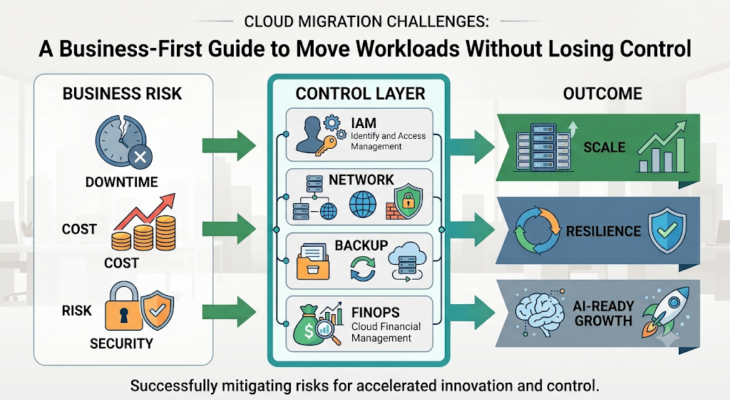

The cloud does not fail businesses because it is weak. Cloud migrations fail when companies treat them as a server move instead of a business change.
Cloud migration is no longer only an IT infrastructure project. For a business, it affects cost, security, uptime, compliance, application performance, customer experience, and future innovation. The goal is not simply to move servers from an on-premises data center to AWS, Microsoft Azure, Google Cloud, Oracle Cloud, or another platform. The real goal is to move the right workloads in the right way, with the right architecture, governance, security, and operating model.What Cloud Migration Means for a Business
Cloud migration is the process of moving applications, databases, servers, storage, networking, backups, and business workloads from an existing environment to a cloud platform. A migration may be a simple lift-and-shift, a move to managed databases, a containerization project, a SaaS replacement, or a full application modernization program.
The best migrations do not start with technology. They start with business outcomes: faster product delivery, better scalability, stronger resilience, lower operational burden, improved compliance evidence, and a foundation for analytics and AI. Without those outcomes, the migration becomes an expensive movement instead of measurable transformation.
Why Cloud Migration Becomes Difficult
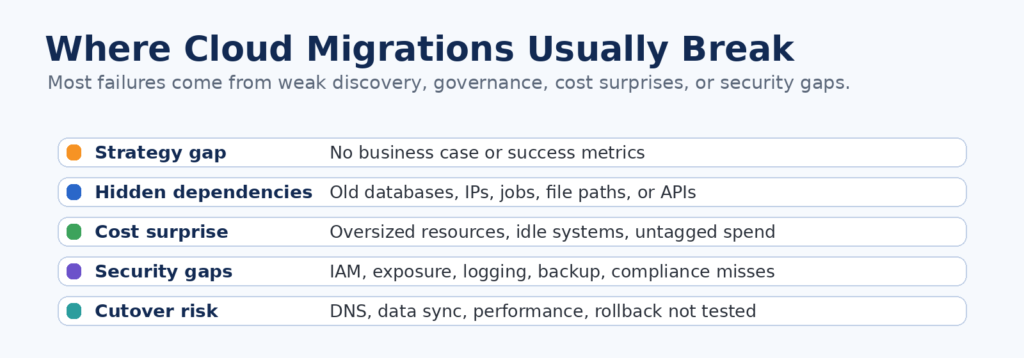
Most cloud migration problems happen because teams underestimate what is connected to an application. A simple web app may depend on a database, file share, identity provider, cron job, firewall rule, internal API, third-party integration, DNS record, license server, or hardcoded IP address. If one dependency is missed, the workload may start in the cloud but fail in production.
Cost visibility is another major shift. In a data center, many costs are fixed or hidden inside hardware, power, support, and licensing budgets. In the cloud, every resource becomes usage-based and visible every month. This improves accountability, but it also creates budget risk when teams over-provision resources, keep unused environments running, or fail to tag workloads by owner and business purpose.
Top Cloud Migration Challenges and Practical Fixes
Use this section as the core business checklist before planning a migration. It keeps the blog readable while still covering the search intent behind “cloud migration challenges” and “cloud migration best practices.”
Choose the Right Migration Strategy: The 7 Rs
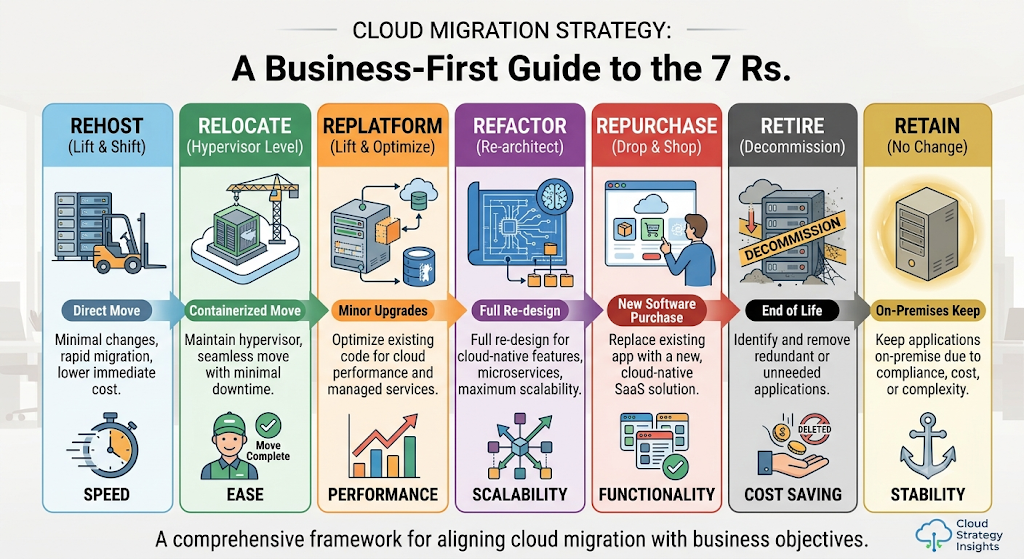
Not every application should move in the same way. AWS describes common cloud migration paths as the 7 Rs: retire, retain, rehost, relocate, repurchase, replatform, and refactor or re-architect. AWS migration guidance is useful because it prevents teams from forcing every workload into the same method.
Public Business Example: Capital One
A useful public example is Capital One. AWS reports that Capital One exited eight on-premises data centers and became the first US bank to announce it was going all in on the cloud. Capital One case study The lesson for other businesses is not “copy Capital One.” The lesson is that migration success needs executive commitment, strong governance, security discipline, observability, and a staged operating model.
For a smaller business, the same idea can be applied in a simpler way: start with low-risk workloads, prove the landing zone, measure performance and cost, then move customer-facing systems only after backup, rollback, monitoring, and access controls are tested.
A 5-Step Cloud Migration Roadmap for Businesses
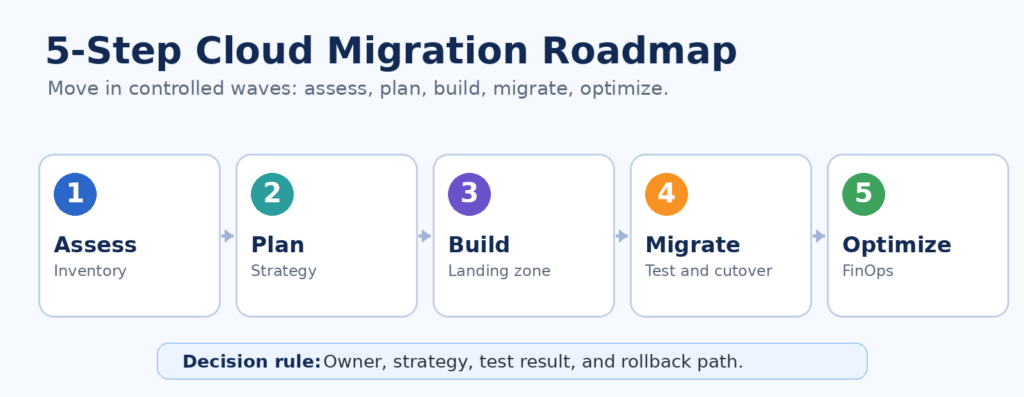
The assessment phase is critical because it identifies workload requirements, dependencies, and the current environment before migration decisions are made. Google Cloud recommends building an inventory, cataloging workload properties and dependencies, and training teams during assessment. Google Cloud migration assessment guidance This is why a good roadmap should be business-led and evidence-based, not only infrastructure-led.
Leadership Checklist Before Moving to the Cloud
- Business goals are defined: cost control, speed, resilience, compliance, modernization, or AI readiness.Application inventory, owners, dependencies, and data flows are documented.
- Cloud cost estimate includes compute, storage, data transfer, backup, licenses, observability, and support.Security foundation includes MFA, least privilege IAM, encryption, private networking, logging, backup, and vulnerability scanning.
Rollback plan, disaster recovery plan, and production cutover steps are tested before go-live.
Post-migration optimization is planned: rightsizing, tagging, budgets, monitoring, patching, and continuous security review.
Cloud Migration Best Practices That Keep Quality High
Start with a cloud readiness assessment. Before choosing tools, document the current environment, application owners, user journeys, compliance needs, traffic patterns, databases, file shares, APIs, batch jobs, and security requirements. This prevents the migration team from discovering business-critical dependencies during production cutover.
Build the landing zone before moving production workloads. A reliable foundation should include account or subscription structure, network design, IAM, MFA, security groups, encryption, centralized logging, monitoring, backup policy, vulnerability scanning, tagging standards, and budget alerts.
Move in waves instead of one big-bang migration. Start with low-risk workloads, validate the operating model, then move higher-risk applications after the team has proven monitoring, rollback, restore, performance, and user acceptance testing.
Cost, Governance, and the Future of Migration
Cloud cost control should be built into the migration plan from day one. Flexera reported in its 2025 State of the Cloud press release that 84 percent of respondents identified managing cloud spend as the top cloud challenge, with cloud spend expected to increase by 28 percent in the coming year. Flexera 2025 State of the Cloud This is why FinOps, tagging, budget alerts, rightsizing, and ownership must be part of the operating model, not a cleanup activity after the bill arrives.
In 2026 and beyond, cloud migration will increasingly support AI-ready infrastructure, modern data platforms, platform engineering, security automation, and stronger compliance evidence. Businesses that win with cloud will not be the ones that migrate fastest. They will be the ones that migrate with control, visibility, and measurable outcomes.
Cloud Migration KPIs for Business Leaders
A migration should be judged by business results, not by the number of servers moved. After go-live, leadership should review a small set of metrics that show whether the cloud environment is faster, safer, more reliable, and more cost-aware than the previous setup.
Common Cloud Migration Mistakes to Avoid
Moving critical production workloads first instead of proving the cloud foundation with low-risk systems.
Skipping dependency mapping and discovering databases, APIs, jobs, file shares, or DNS issues during cutover.
Treating cloud cost as only a finance problem instead of making engineering teams own tagged workload spend.
Copying the old data center security model instead of using cloud-native IAM, logging, encryption, and guardrails.
Declaring migration success before backup restore, performance, user acceptance, monitoring, and rollback are tested.
Conclusion
Cloud migration can transform a business, but only when it is planned as a business transformation program. The biggest cloud migration challenges are poor strategy, hidden dependencies, cost overruns, data complexity, security gaps, downtime, performance issues, legacy systems, skill gaps, weak governance, hybrid complexity, and vendor lock-in. A successful migration builds a secure, scalable, cost-efficient, and future-ready cloud foundation. The goal is not just to move to the cloud. The goal is to run the business better in the cloud.